You logged breakfast, lunch and dinner and look at the total: calories almost there, protein short, carbs over. Fixing it by hand takes twenty minutes: a bit less rice, a bit more cottage cheese, recount, still off. Sounds familiar.
This article explains how auto-fitting macros to a daily limit works: what it adjusts, what it leaves alone, why it sometimes refuses and how to use it to plan a day in the morning instead of patching it at night.
In short
- A daily target is four numbers at once: calories, protein, fat and carbs. All four have to meet, not just one.
- Auto-fit changes the amounts of foods already logged. It never adds new ones, so the day stays yours.
- Every food has limits: from half a portion to two and a half. Greens and cucumber are not touched at all.
- When the logged foods cannot reach the target, an honest "add a recipe" beats a kilogram of onion.
Why a day rarely lands on target by itself
A daily target is not one number but four. Calories, protein, fat and carbs are tied together: protein and carbs give 4 kcal per gram, fat gives 9. Add cottage cheese for protein and calories climb; drop the oil to save calories and fat collapses.
That is why manual tuning turns into a seesaw. You move one amount and all four numbers shift, often not where you wanted. Especially when the day has twenty items, like any lunch cooked from a recipe.
4
kcal in 1 g of protein
9
kcal in 1 g of fat
4
kcal in 1 g of carbs
The good news: this is an ordinary problem of fitting several numbers at once, and a phone solves it in a fraction of a second. The bad news: it has to be solved carefully, or you end up with 40 grams of chicken and three kilograms of cucumber.
What auto-fit actually does
Auto-fit takes everything already in the day and looks for amounts at which calories and macros together end up closest to the target. It does not add foods and does not remove them: the composition of the day stays yours, only the quantities change.
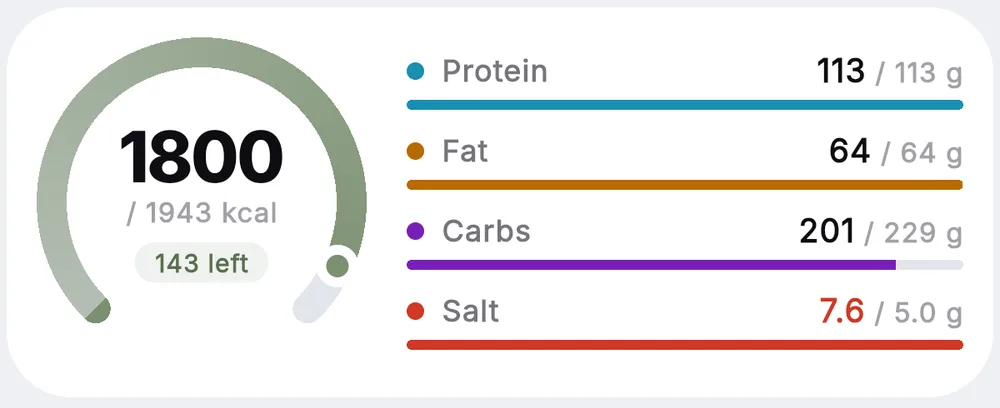
The key word is "together". The fit looks at all four numbers at once and searches for a compromise where none of them runs far. Calories weigh a little more than the rest: if something has to give, the day should meet its calories first.
- 1
Starts from the current amounts
Nothing is reset. If you already tweaked something by hand, the fit starts from your numbers.
- 2
Moves foods within sensible limits
Each item can shrink to half at most or grow to two and a half times at most, and never past a kilogram.
- 3
Leaves "empty" foods alone
Cucumber, greens, onion, spices: things with almost no calories. You could scale them forever without moving the total, so they stay put.
- 4
Checks the hit
Calories within 5%, macros within 10%. Hit: the amounts are applied. Miss: nothing changes, and you see why.
Log a day in Zru & Hudnu and see where your calories really go
Try it freeWhat it looks like in Zru & Hudnu
The entry point lives where you already look at the total: the home screen. Tap calories, protein, fat or carbs on the day card and the metric card opens with two buttons: sparkles for auto-fit and a dial for manual tuning.
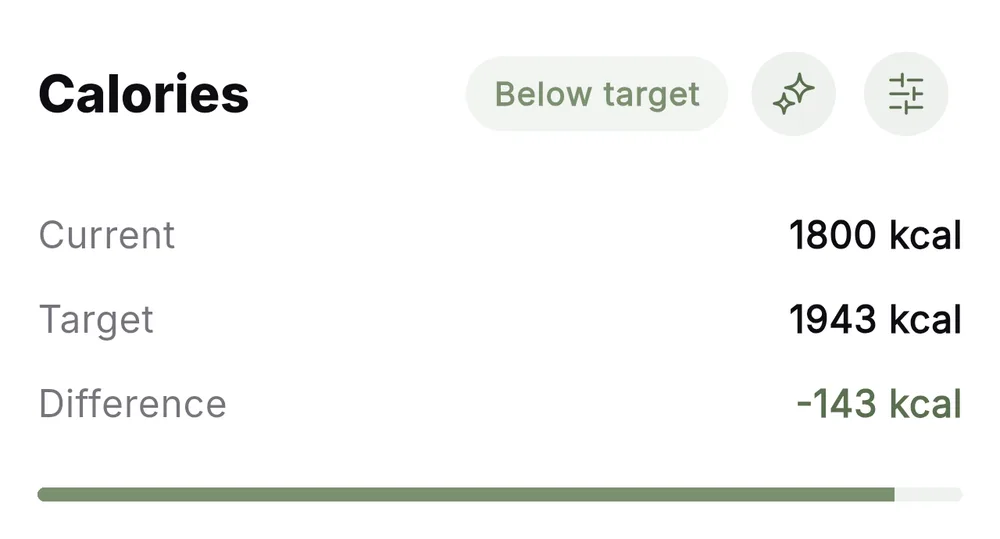
The card you came from decides what is ticked. From calories everything moves. From protein the fit first tries protein foods only, and if they cannot reach the target it honestly takes all of them. After the sparkles, old amounts are struck through, new ones highlighted, the total at the top recalculated.
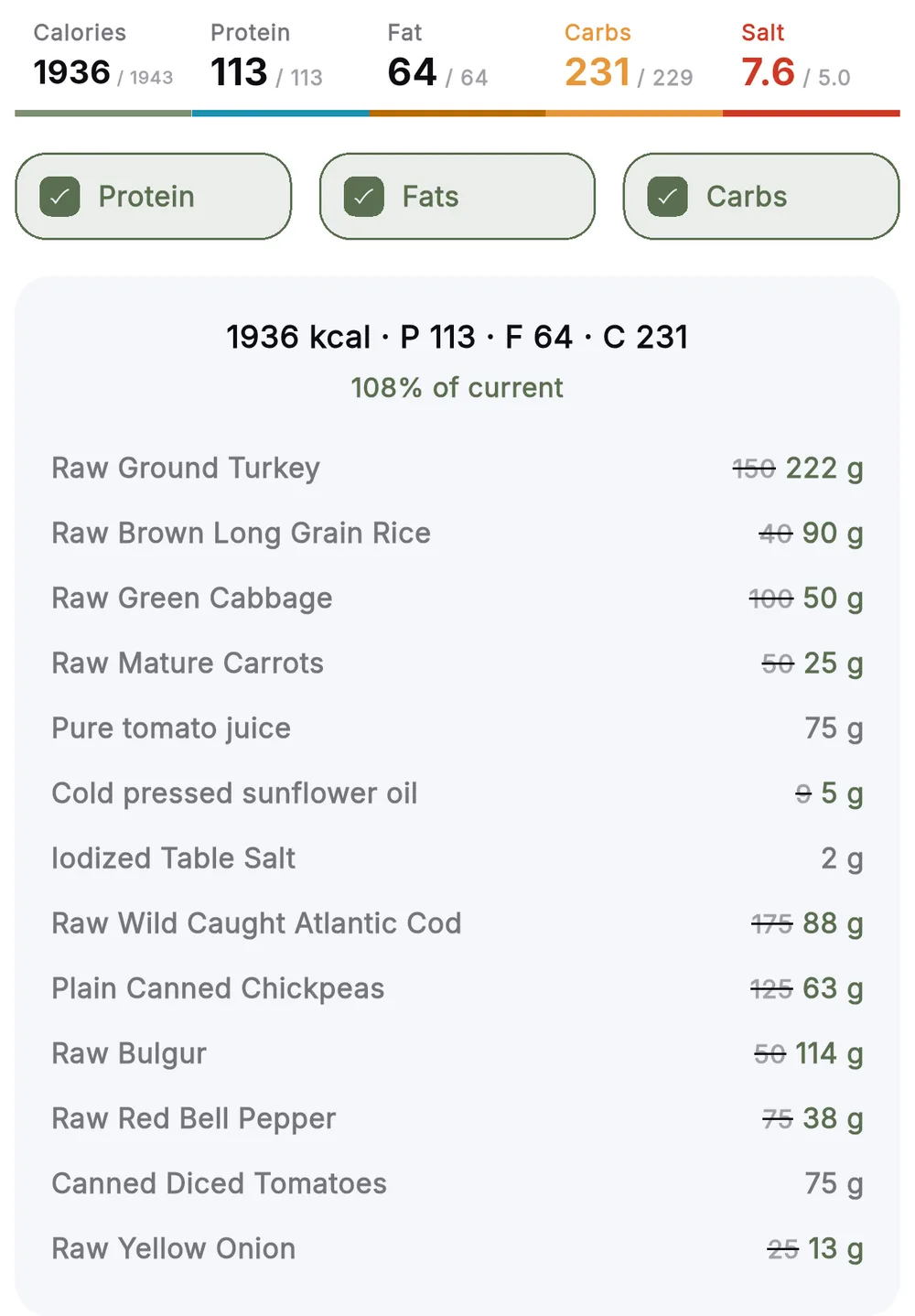
- Amounts after the fit are whole grams: 88 g, not 87.6.
- Salt, spices, water and greens stay where they are.
- The Protein, Fat and Carbs ticks limit what can move. Untick one and that group stays put.
- Anything you tuned by hand is not reset: the fit starts from the current numbers.
- It applies to this day only. Saved recipes do not change.
When the magic honestly says no
The fit is not almighty, and that is right. If the day holds only a salad and a coffee, no amounts will turn them into 2000 kcal. Older algorithms would scale onion to a kilogram and report success. Here you get a short message about what to do instead.
| What you see | Why | What to do |
|---|---|---|
| "The foods already logged cannot reach the daily targets. Add a recipe" | Too few foods or too light: even 2.5 times more does not get there | Add one solid meal: a recipe or a food basket, then fit |
| "Even at half portions the day stays over the targets. Remove something" | The excess is too big: half portions are still above target | Remove one item, most often oil, nuts or something sweet |
| Carbs 231 against a 229 target while calories are exact | A food hit its limit and the fit picked the best compromise | Nothing: it is within tolerance. Or untick carbs and tune by hand |
A fit that never refuses is just lying more nicely.
Plan the day in the morning, not fix it at night
The most useful moment for auto-fit is not the evening when everything is eaten, but the morning or the day before. Drop into the day what you actually plan to eat, roughly and without a scale. Tap Auto. You get a plan with exact amounts that meets all four numbers, and you can simply follow it.
- Add everything you plan to eat to the day, at least roughly.
- Make sure no meal is empty: the fit needs something to work with.
- Tap calories on the home screen and run Auto.
- See which amounts grew: that is what to buy extra of.
- Apply to the day and follow the plan; in the evening you only tick off what you ate.
That turns the diary from "logged it and felt bad" into a planning tool. You decide what you eat. The app works out how much.
Questions people ask
Does auto-fit add new foods?⌄
No. It only changes the amounts of what is already in the day. If foods are missing, it says so instead of slipping in something of its own.
Why did onion and cucumber not change?⌄
They have almost no calories and do not move the total. So the fit does not scale them to absurd amounts, foods under 25 kcal per 100 g stay put.
Can I fit only protein and leave the rest alone?⌄
Yes. Open the fit from the protein card: only the Protein tick is on and only protein foods move. If they cannot reach the target, the fit takes all foods and shows that with the ticks.
Will the recipe itself change after the fit?⌄
No. Applying affects only this day's entries. The recipe, its own tuning and other days stay as they were.

Author
Tania, nutritionist
Tania is a nutritionist who runs the «Zru & Hudnu» weight-loss marathons and co-created the app. She writes the calm nutrition blog without crash diets.
About the author →
Try fitting your own day
Add what you plan to eat to Zru & Hudnu and tap Auto: the app finds the amounts at which calories and macros meet. You can start for free.
Keep reading